NewBatch AI dispatching — with the fewest empty kilometres

Your road transport, run by AI, from order to invoice.

TruckFlow brings together orders, smart dispatching, trailer coupling prep, live tracking, an offline driver app, fleet, workshop and billing. Every truck leaves with the right trailer, the right driver, at the right time.
13 job profiles 100% offline driver app Driver app in French · العربية API & webhooks
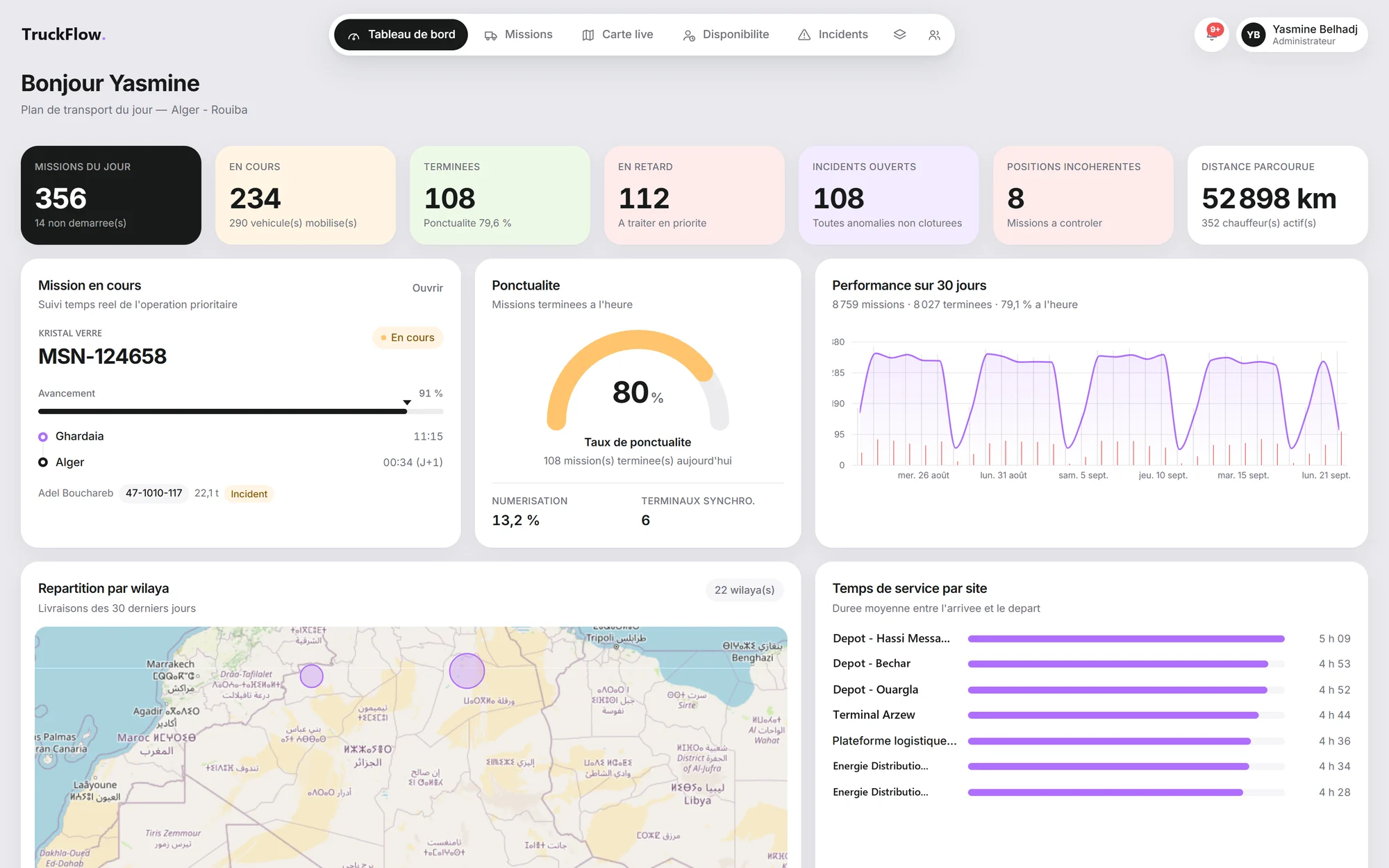
app.truckflow.io/tableau-de-bord
TruckFlow dashboard: today's missions, in progress, completed, late, incidents and distance covered
AI dispatching · session
0 / 30 orders assigned
Couplings to prepare0
Empty approach—
Field · real time
Arrived at loadingMSN-124643 · 06:33 · position verified
Coupling confirmed09-1040-118 + BLD-R022 · Reefer
Delivery note receivedMSN-124658 · 2 pages · stop 2
Pre-trip check: to monitor30-1028-123 · tyres · photo attached
Pre-trip check passed16-1051-118 · 10/10 points
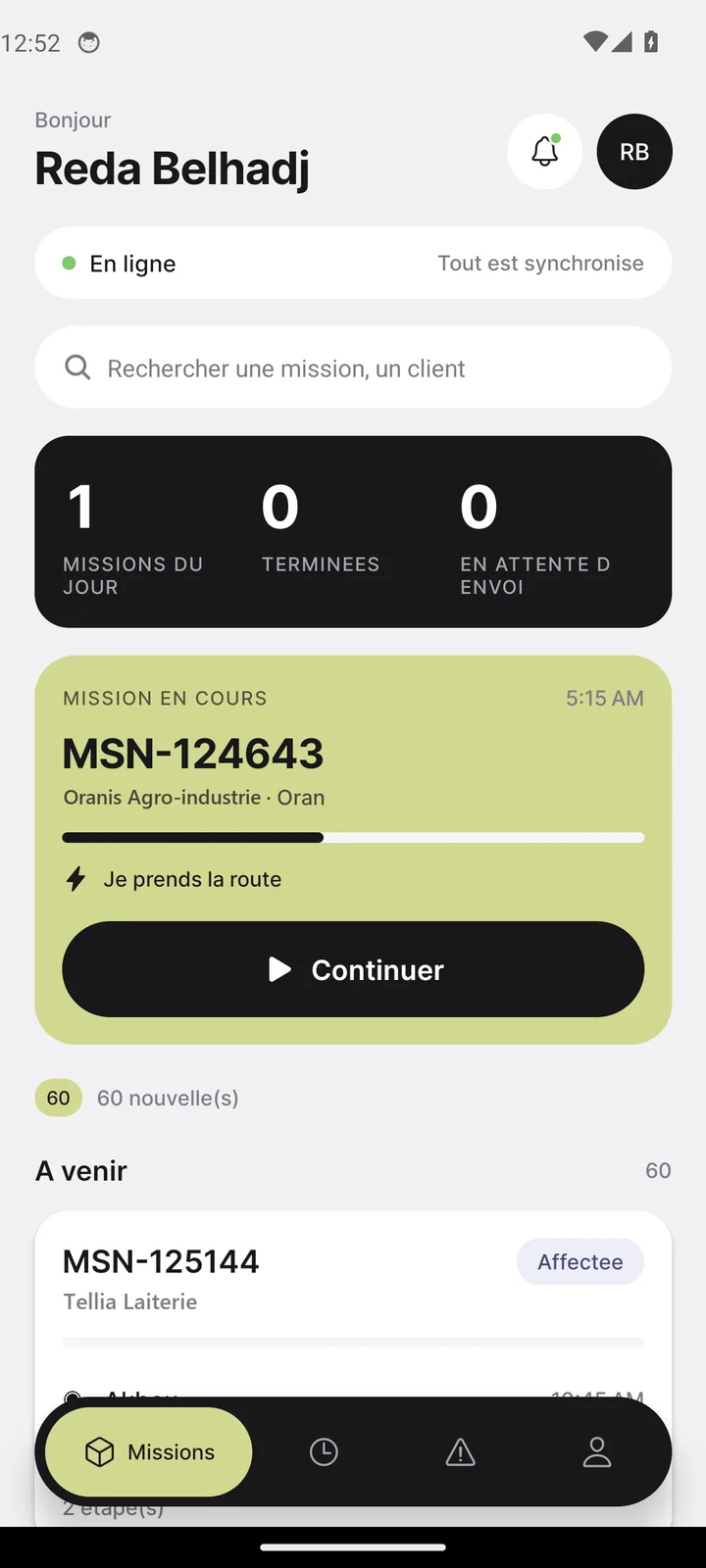
TruckFlow driver app: current mission and Continue button

Every body type · every road transport trade

Reefer Tanker & ADR Curtainsider Flatbed Box van Oil & gasFood & beverageIndustrial distributionBuilding materialsContract shuttlesSubcontracting
0

field events tracked per mission, from departure to mission end

0

job profiles, from driver to supervision

0

fine-grained permissions, module by module

0%

of driver reports possible without network

0

languages in the driver app: French and العربية

One chain, no breaks

From the customer's order to payment, every action is tracked.

Eight steps, one data set. What sales enters, planners schedule, the yard couples, the driver reports and billing invoices — with no re-keying.

STEP 01

—

—

WHO ACTS
BUILT-IN SAFEGUARD

—

AI dispatching

Assign the whole batch at once. With the fewest empty kilometres.

The engine weighs every confirmed order, tractor, trailer and available driver together. It builds compatible combinations and minimises empty approach across the whole session — not order by order.

  • Business constraints respectedRequired body type, capacity, licence, ADR, valid qualifications, workshop downtime.
  • Road distancesApproach, route and arrival time calculated by road, not as the crow flies.
  • AI that explains itselfEvery unassigned line shows its reason — BOX required, CURTAIN available.
  • You stay in controlOne click applies the session: missions are created and the selected resources become unavailable.
IADispatching session · Blida depot
Standby
Orders in batch4
Assigned0
To complete0
Empty approach0 km
Simulator

One by one, or the whole batch?

Handling orders in arrival order leaves the last ones served by distant trucks. Batch optimisation spreads approach distances across the whole set.

One by one— km
Batch · AI— km
Empty kilometres saved
—

Randomly generated scenario: 8 trucks, 8 orders. Real-world savings depend on your network.

Equipment preparation

Every tractor leaves with the right trailer.

TruckFlow turns the transport plan into yard tasks, depot by depot: no trailer, to couple, to uncouple, ready. Each departure reads as a picture — the tractor, its trailer, the body type drawn — and a confirmed coupling switches straight to “Ready”.

BLIDA DEPOT TRUCKFLOW TRUCKFLOW TRUCKFLOW
MSN-128024 · departs 09:45
Required body: Reefer
Truck 09-1040-118 · trailer BLD-R022 · N. Larbi
To couple
Fifth wheel locked Body type matches Landing legs raised Brakes & lights connected
Live tracking & field events

What's on the road, live. And what's off, right away.

Eleven events mark every mission, reported from the phone as they happen. Each report is geolocated, time-stamped and compared with the expected site.
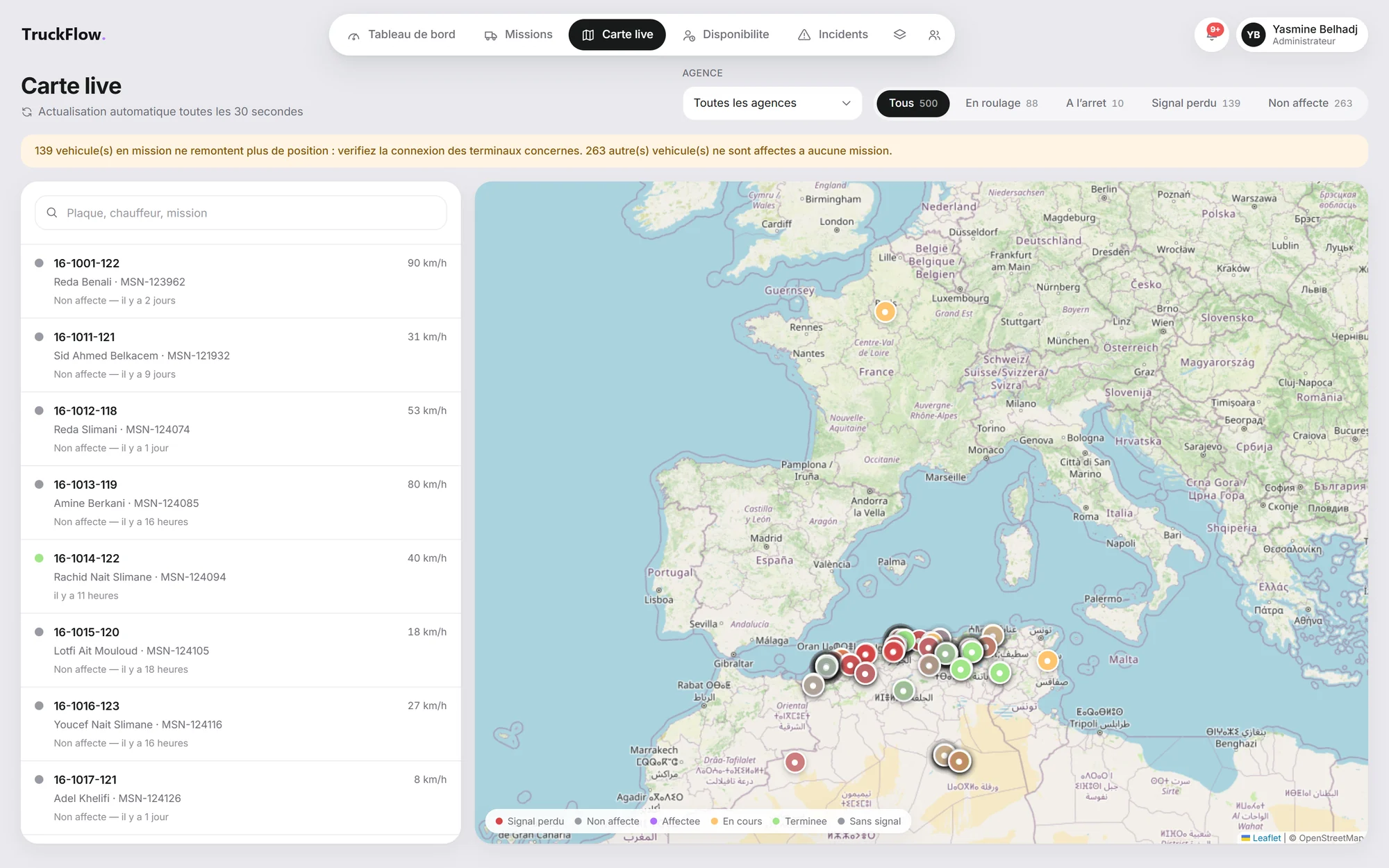
app.truckflow.io/carte-live
TruckFlow live map: vehicle positions, filters for moving, stopped, signal lost and unassigned
Silent device
16-1012-118 · MSN-124074
Last position 2 h ago — shown as stale, no longer as current.
MSN-124643
Hassi Messaoud → Oran · 22.1 t
In progress
Inconsistent position detected

Reports made outside the expected site's zone are flagged on the map and in the timeline — usually a wrong site, rarely a lost truck.

Planned vs actual

Each event shows its gap to the planned time: +7 min, +1 h 15. Delays show up before the customer calls.

Customer tracking link

Give your customer a link to follow their shipment — no account, no call to operations.

Driver app · Android

One question at a time: “what do I do now?”

Big type, one big button, the next step. The app offers the expected event exactly when it's expected — and keeps working without network.
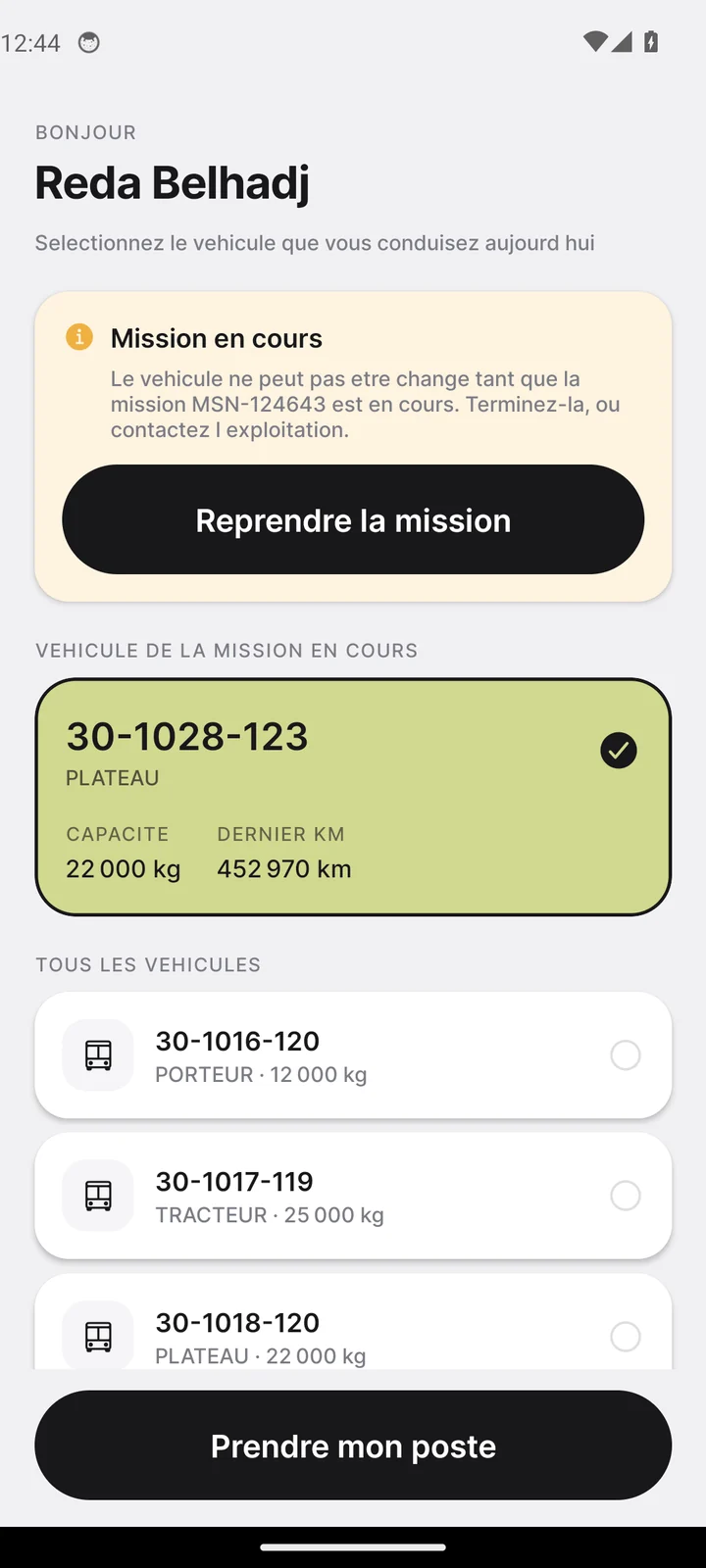
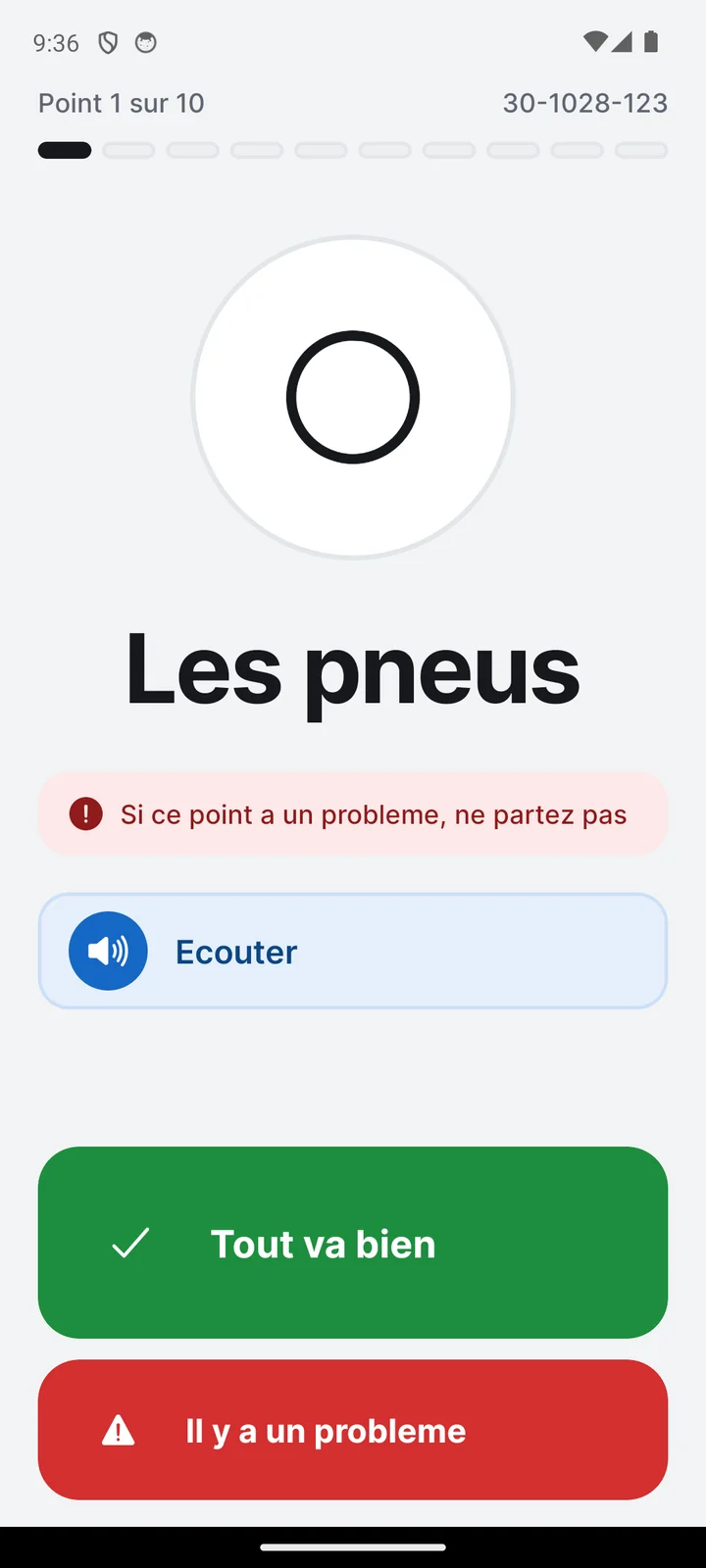
    Driver app screen
    Fleet, workshop & compliance

    A fleet that's available, compliant, and whose cost per kilometre you know.

    Maintenance, repairs, parts store, compliance, fuel and tyres feed operations directly: a truck in the workshop is no longer offered to dispatching.

    Maintenance

    Due dates driven by the odometer

    A plan — oil change every 30,000 km or every six months — applies to the vehicles concerned. The driver's odometer reading at shift start moves the schedule forward.

    30-1028-123 · TRACTOR
    Oil change in 1,240 km
    0 %
    Compliance

    Paperwork up to date, for trucks and drivers alike

    Insurance, roadworthiness test, permits; licences, medicals, qualifications, ADR. An expired qualification excludes the driver from the jobs that require it — with the reason.

    ADR · A. Belaid
    D-8
    Inspection · 30-1024
    D-21
    Insurance · 16-1051
    D-46
    Medical · R. Benali
    D-60
    Fuel

    Drifts, not just fill-ups

    Consumption is calculated between two fill-ups; any deviation beyond the threshold is flagged.

    Drift +18%
    Tyres

    Every tyre tracked, position by position

    Below the legal limit, the tyre is flagged on the vehicle plan.

    1.4 mm · below limit
    Costs

    Cost per kilometre, item by item

    Fuel, maintenance, tyres, parts: the outlier vehicle jumps out.

    ● fuel ● maintenance ● tyres
    Workshop ↔ operations

    From the driver's report to the vehicle's cost, with no re-keying

    Sales, subcontracting & billing

    Sold right, bought right, invoiced without credit notes.

    Contracts and rate cards, road-based quoting, transport purchasing from partner carriers, pre-invoices approved by the customer: margin reads order by order.

    Contracts & quoting

    A quote in three seconds

    Distance is calculated by road, the contract rate card applies, surcharges are added on top. A changed rate card never recalculates an order already quoted.

    Lyon → Marseille · road distance315 km
    Rate card · 250–350 km band€560
    Diesel surcharge+ €34
    Motorway tolls+ €68
    Waiting (2 h)+ €80
    Selling price€742
    Transport purchasing

    Subcontract at the right price

    Carrier tenders, offer comparison, award. Cost becomes an agreed price — and the incoming invoice is matched against it before payment.

    ODT-202610-1908 · Lille → Marseille · sold for €1,650
    Carrier A€1,520
    Carrier B · awarded€1,440
    Carrier C€1,590
    Invoice received: €1,525 — €85 above the agreed price, caught before payment
    Customer billing

    The pre-invoice: the detour that prevents credit notes

    A period's delivered orders are submitted to the customer before invoicing. Prepare, approve, issue: three permissions, three pairs of hands.

    1Pre-invoice preparedOperations
    2Submitted to customerCustomer
    3Approved or disputedSupervision
    4Invoice issuedBilling
    5Payment recordedBilling
    Recurring orders

    Contract shuttles, generated in advance

    A rule — three tankers a day, Sunday to Thursday — generates its orders over the chosen period. The preview shows the dates before anything is created.

    Margin

    Seeing what you sell isn't seeing what you earn

    Selling price and margin are two separate permissions. The columns only appear for authorised profiles.

    ODT-202610-1900 · Lyon → Marseille€742
    Margin€78
    Roles, scopes & security

    Everyone sees what they need to see. Nothing more.

    The profile defines what an account can do; the scope defines which branches it can do it for. The interface only shows what the profile allows — forbidden buttons are absent, not greyed out.

    —

    —

    0permissions / 81
    Scope by branch

    A branch account sees its own branch and those entrusted to it. A record outside scope is reported as not found.

    Immediate rights

    Changing a profile or scope instantly closes open sessions: a revoked right is revoked right away.

    Segregation of duties

    Preparing, approving and issuing an invoice are three separate actions. Supervision sees everything and enters nothing.

    A trail that can't be rewritten

    An event is corrected with a reason, never erased. Logs show who did what, and when.

    Integrations & API

    Plugged into the rest of your information system.

    Third-party systems feed TruckFlow or query it: shipper orders, fuel card fill-ups, telematics positions, accounting entries.

    • One API key per systemEach key carries its own scopes and can be revoked without cutting off the others.
    • Event webhooksDeclare where TruckFlow should push its events: mission created, delivered, incident…
    • Replayable event queueWhat was sent, what failed, what's pending: a failed delivery is replayed once the cause is fixed.
    The platform in pictures

    Built for operations, screen by screen.

    app.truckflow.io

    Getting started

    Up and running in four steps.

    Master data

    Branches, vehicles with their body type and capacity, drivers with their usual truck, geocoded customers and sites.

    Accounts & scopes

    One profile per role out of thirteen, one scope per branch. Temporary password changed at first login.

    Contracts & billing

    Rate cards and surcharges, company billing identity, default document template.

    First dispatch

    Confirm the order book, run the session, apply: missions go out to the drivers' phones.

    FAQ

    What we're asked most.

    Does AI dispatching decide instead of the planner?
    No. It proposes a session: a batch of orders, the selected resources and how many orders are covered out of the total. You apply it as is or complete the unassigned lines, whose reason is always shown — no free trailer of the required body type, compatible trucks out of range, insufficient capacity. Nothing is created until you approve.
    What happens when the driver has no network?
    They keep reporting as usual. Everything is stored on the phone and sent when the network returns; a counter shows what is waiting to be sent. If the server rejects an item, it appears separately with the reason — it is never silently resent in a loop.
    Can we subcontract jobs to other carriers?
    Yes. The Transport purchasing module manages carriers and their rates, tenders, awards and checks of incoming invoices. A subcontracted order carries no mission and can only carry one subcontract.
    How are access rights managed?
    By profile (13 profiles, 81 permissions) and by scope (home branch and entrusted branches). Five failed login attempts temporarily lock the account; any change of rights immediately closes open sessions.
    Does TruckFlow integrate with our tools?
    Yes: scoped API keys, event webhooks and a replayable queue. Fill-ups can come straight from a fuel card, orders from a shipper's system, with their instructions.
    Is the driver app available in Arabic?
    Yes. The app displays in French or Arabic, as the driver prefers, and the setting can be changed at any time from their profile.
    Personalised demo

    Run your fleet with the fewest empty kilometres.

    30 minutes on your own flows: a batch of orders, your fleet, your depots. You leave with a costed dispatching session.

    No commitment Reply within 24 h Onboarding support

    Thank you! Our team will get back to you within 24 h.